
AI Floor Plan Colorizer & Presentation
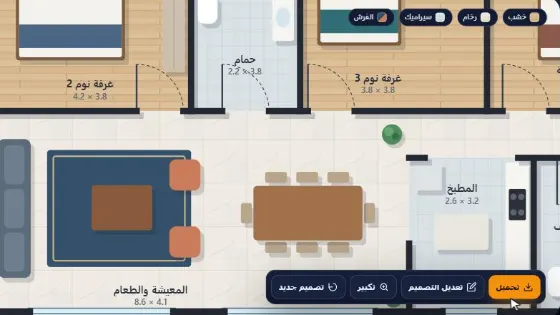
Colorizes and presents furniture/flooring on an architectural plan while preserving partitions and spaces exactly.
Who is it for?
Colored plan presentations for clients without redrawing
How it works — step by step
- Select Colorize & Presentation.
- Upload a clean architectural plan image.
- Press Process.
- Receive a colored plan with furniture/flooring — walls and layout unchanged.
How to get the best result
The plan must be readable with clear lines. The model only colorizes — it does not replan spaces.
Pro tips
- Avoid extremely cluttered annotated drawings when possible.
- Upload the highest available resolution.
- Better for pre-execution presentations than dense construction drawings.
Example
Example: B/W 120m² apartment plan → colored plan with flooring and furniture per room, same partition layout.
FAQ
What is "AI Floor Plan Colorizer & Presentation" in Boh AI?
Colorizes and presents furniture/flooring on an architectural plan while preserving partitions and spaces exactly.
Who is this tool for?
Colored plan presentations for clients without redrawing
How do I get the best result?
The plan must be readable with clear lines. The model only colorizes — it does not replan spaces.
Can I try it for free?
Yes. Create a free Boh AI account with your email and get welcome points to try the platform, then pick a plan when you need more. Some advanced tools are available to subscribers only.
Does it support Arabic and English?
Yes. Boh AI is fully bilingual (Arabic & English): interface, guides and results — write your request in either language.
 AI Kitchen Design
 AI Material & Texture Extraction
 AI Architectural Mood Board Generator
 Architecture Graduation Project Board Maker
 Design Negotiator: AI Client Negotiation Practice
 Super Boh — Professional AI Architectural Rendering